Freitag, 22. Mai 2015

Smalltalkify Groovy

By adding some Mixins to a groovy script, it is possible to use some smalltalk-like expressions like

ifTrue: [ do something ] ifFalse: [do something else]

Or do some smalltalk-like exception handling like

[ aBlock ] on: #Error do: [ something ]

In groovy this would look like:

Find the full source here: gist on github

Mittwoch, 10. Oktober 2012

Using Processing.js with Amber


"The Processing language was originally created at MIT as part of the Media lab and Aesthetics and Computation group. They needed a way to bridge the gap between software developers, artists, data visualizers, etc., and to do so in a way that allowed new programmers (or non-programmers) to do complex visual work easily. Processing was built using Java, and can be thought of as a simplified Java, with a simplified Java API for drawing and graphics." (source)

Since it is possible to write Processing code with pure JavaScript, it should be possible to use Amber with Processing.
And so it is - with some little tricks.
First, Processing should get initialized in the html page like this

A Processing instance will be created, it can get accessed via Amber in this way:

processing := <Processing.instances[0]>.

After fetching this instance, it can be used like any other Smalltalk Object:

processing background: 224.

processing line: centerX y: centerY dX: myDX dY: myDY.

I converted the clock-example to Amber, you can find it in the Example-section of my Amber Git repo. And maybe soon in the "official" Amber-Examples.

You can try it out here.

Mittwoch, 27. Juni 2012

Android-Binding for GNU Smalltalk ready!

Essentially it's no big thing - just a few lines of Smalltalk-code: i created a GNU Smalltalk star Package including the "Android" class that gives access to the full Android API via SL4A.
Usage is simple. First file in the package with:

PackageLoader fileInPackage: 'Android'.

Then you can use it like this:

| android |
android := Android new.
android makeToast: 'Hello World!'.

A more complex example, using some dialogs, is included in the smalltalk_for_android.apk (you can use the QR-Code below to install the apk - but remember that you need to install sl4a before. See my previous blog-post).
To get an idea what is possible, see the the API reference. I think it is a wonderful perspective to write full blown Android apps with Smalltalk.
Coding Smalltalk on a phone or tablet is fun - the sl4a editor is a big help because it contains an api reference. If you want to hack more complex scripts, you can remote control your phone or emulator, just follow this instructions. Only one difference: you need to set the environment-variable AP_HANDSHAKE to some arbitrary value.
With this setup you can execute your script with "gst myscript.st" or just call the api via the gst console.
Sourcecode etc. is available on github.


Mittwoch, 13. Juni 2012

GNU Smalltalk on Android

I crosscompiled GNU Smalltalk 3.2.4 with the Android NDK (r8).
Because interaction with GST on Android was complicated (couldn't read stdout/ stderr reliable), i decided to use the Android Scripting Framework.
So if you want to try it, first you need to install SL4A. You should install the sl4a_r5.apk (not r4!)
After installing SL4A, you can download and install smalltall_for_android.apk. Remember to allow installation from untrusted sources.
I tested "smalltalk for android" with an android virtual device running Android 2.3.3. The Screenshot was made on my Samsung Galaxy S3.
Currently there is no binding for the SL4A API - you can execute Smalltalk code, but there is no interaction with the Android API.
So, if anyone would like to help implementing the JSON-RPC bridge to SL4A - that would be really great.
The Source is on github.

Samstag, 21. Januar 2012

Domain-Verification mit Schlund Technologies für Google Apps

Ich habe ein Google Apps Konto für eine Non-Profit Organisation eingerichtet. Die Domain, die ich mit dem Konto nutzen möchte habe ich bei Schlund Technologies gekauft.
Um nun die Domain mit dem Google Apps Konto nutzen zu können, muss diese verifiziert werden - das war aber in meinem Fall eine echte Herausforderung. Dieser Spezialfall scheint auch nicht dokumentiert zu sein.
Es gibt verschiedene Möglichkeiten der Verifikation, so kann man z.B. auf der Homepage der Domäne spezielle HTML-Tags einfügen oder auf dem Server eine präparierte Datei ablegen. Das Vorhandensein dieser Informationen impliziert, dass man Eigentümer der Domäne ist.
Das funktioniert nur leider nicht, wenn man nur die Domain hat und keinen zugehörigen Webspace (den will man ja gerade mit Google Apps verwalten).
Die andere Variante ist, bei der Domänenkonfiguration einen TXT-Record mit einem speziellen Wert anzulegen. Google fragt den TXT-Record beim Nameserver ab und kann so das Eigentum an der Domäne verifzieren. Die Konfiguration des speziellen TXT-Records ist bei Google Apps für einige Domain-Provider beschrieben - leider nicht für Schlund.
Nach mehrstündigem rumprobieren und diversen Forensuchen konnte ich das Problem lösen: Bei Schlundtech kann für den neuen TXT-Record ein Name angegeben werden. Hier muss "@" eingetragen werden.
Interessanterweise konnte ich den TXT-Record speichern und die Google-Verifikation erfolgreich zum Abschluß führen. Beim nächsten Aufruf der Domain-Konfigurationsmaske bei Schlund war das @-Zeichen wieder verschwunden.

Donnerstag, 5. Januar 2012

Ambrhino

Today i'd like to announce my newest Project "Ambrhino". Ambrhino integrates Amber Smalltalk with the Java Virtual Machine.
Ambrhino can act as a Server to serve Amber and persist changes to the filesystem (you could use it instead of node.js).
It can also act as a runtime to execute Amber-Programs.
Ambrhino is written in Java and uses JSR223 to execute Javascript with the Mozilla Rhino Engine
An interesting feature is, that you can directly call Java classes from a compiled Amber Smalltalk, e.g.:


buttonPrintit := .
buttonPanel add: buttonPrintit.


A really cool feature is that it seems to be possible to add Smalltalk BlockClosures as ActionListeners to (Swing-) Buttons like this:


buttonDoit addActionListener: [ 
self eval: (textArea javaObject getSelectedText).
].

The main goal of this project is not to use Amber to write Swing-Applications - it feels somehow weird to use a Webbased-IDE to create a native Swing Application ...
Someday i want to use it to create Android-Applications with Amber - i could start an Ambrhino-Server on the Android-Emulator to create/ compile/ package programs. The Android-API will be called with the Android Scripting Framework (ASF)
But to get familiar with the (sometimes strange looking) Smalltalk-Java-Javascript-Mixture, i made a little Swing-Application - a simple Workspace to execute Smalltalk-Code.

To try it out you may fork the project on Github or just download the ambrhino.zip unpack it and start the workspace.bat file.

Like in other Smalltalk-Workspaces you can select text and execute it by pressing  "do it" or "print it".

To get an idea of what is possible you can copy this gist to the workspace and execute it. It fetches via HTTP-GET content from a Webserver and displays it on a JTextPane. Not really useful - but somehow cool.

Ideas, Hints, Help and rants are very welcome!

Freitag, 23. September 2011

Using Amber with a free WebDAV-Service

I really love Amber - but there's one thing i could not get used to. To persist the code you produce you need to setup a local WebDAV-Server or you need to run the Amber server-tool based on node.js.
The Problem i had is that i wanted to work only with a browser. Do some work on my PC, then switch to my wifes notebook, work in an internet-café, have a quick look at some code when i'm at my mothers house and so on.
My first attempt was a project on the google-app-engine, where jtalk (now "Amber") code was saved to a database. That approach was a quick hack and somehow proprietary. I also ran JTalk on the JVM on the serverside using google-backend-technology. Everything was much too complicated.
My current idea is to keep everything simple, use free services and have a real cloud-approach. I needed a free WebDAV-Service, accessible by a Webbrowser and the possibility to sync my files with a local folder on my harddisc.
I had the idea to use Dropbox, because Dropbox has an easy to use syncing tool and a nice web-view. I used Dropbox to server my Twitterwall demo for Amber. It would be quite easy to put a git-repository in my public Dropbox-folder and server Ambers index.html to the Cloud. But since Dropbox has no WebDAV-support it would not be possible to work from somewhere and save code and then push the changes to github when i'm back to a PC with git installed. To solve this problem, i would need to use the Dropbox-API. But that approach has other difficulties ...
On my quest i was experimenting with a lot of Cloud, WebTop and Filehosting Services and the only one that was easy and free to use and was working with Amber was the gmx MediaCenter.
There are just a few steps:
  1. Register a gmx account
  2. Navigate to the MediaCenter
  3. Upload the git-repository with Amber sources (drag & drop)
  4. Navigate to https://webdav.mc.gmx.net/ and login with your gmx-passwort
  5. Go to the index.hmtl in your amber-folder, do some coding and press "commit package"
The commited Category js will be updated in the gmx MediaCenter!
When you want to push your code to github, you just need to go to a PC where you can sync your gmx MediaCenter to a local disc and where a git-client is available.
It's possible to share WebDAV-folders with other gmx users so you easily could collaborate outside of github.
There's only one drawback - you can't grant access to everybody, it's restricted to gmx-users. So if you want to show something to a wider audience you would need to copy the files e.g. to your Dropbox folder.

Mittwoch, 21. September 2011

A Twitterwall with Amber

Amber, formerly known as JTalk, is evolving. It is so much fun playing with Smalltalk just only with a browser - it's addictive! So i wanted to contribute a little Example of how Amber can be used to mesh-up Web2.0 stuff.
The result was a very simple Twitterwall using the restful Twitter-Search API. I pushed it to my amber-fork on github and made a pull-request. Nicolas already pulled it and now it's in the amber examples-section.
You can have a look at it in my public Dropbox folder. You can examine the two responsible classes Tweet and TwitterSearch in the Examples category from there too.

Dienstag, 20. September 2011

An Eclipse-Plugin for Redline Smalltalk

I just started the development of an eclipse-plugin for redline smalltalk. It is the very first preview but i wanted to release this early to be prepared for any wishes/ commets etc. The project ist hosted on github.
I'm using Xtext for parsing/ syntax coloring/ code completition etc. So i have to reimplement parts of the parser, but Xtext is very powerful and we can use all of the nifty features of the eclipse plugin development environment.
Currently it's only an Editor but it could be enhanced to an own "Perspective" with more Smalltalk-Development Tools, e.g. 
  • Class Hierarchy Browser (by switching to that perspective all .st-files would get parsed to an ecore-model)
  • Debugger (it's already there)
  • Transcript (a console, it's already there too)
  • a Workspace (we could use something like the eclipse-scrapbook-pages for that)
This Perspective could be packaged as an own RCP-Application so we would have a standalone Smalltalk-IDE ... 


The plugin registers a viewer for files with the extension ".st"
The viewer has two tabs. You can switch between the source view with syntax coloring and code completition and the class view, where you can select from a list of methods and see the associated method-source.
Any Ideas and wishes are welcome!

Mittwoch, 6. Juli 2011

Java Hirsch

Bei der Recherche nach der Frage, ob ein öffentlicher default-constructor bei einer EJB3-Entity Bean jetzt ok ist oder doch eher ein anti-pattern, werde ich per Google-Anzeige gefragt, ob ich ein Java Hirsch bin:
Mir stellt sich natürlich die Frage: Was ist ein Java Hirsch?
Hier ein Auszug aus einem Reisebericht: "Heute lebt der Java-Hirsch im Hochland von Mauritius, wo Zuckerrohr angebaut wird und wo der Primärwald beginnt, eine Mischung aus Lichtungen, Gras und Bäumen. Um die Hirsche zu sehen, geht man am besten zu Fuß auf den Wegen eines ökotouristischen Anwesens. Die Jagd ist auch im Chasseur möglich, mit einer Gebühr für die Schlachtung."
Mal abgesehen von der Schlachtung klingt das doch eigentlich ganz idyllisch.
Da es sich aber wohl eher um eine Art Stellenanzeige handelt, recherchiere ich weiter und stelle fest: "Unter einem Hirsch verstand man um die Wende des 19. zum 20. Jahrhundert einen ausgelernten Schneidergesellen, der bei einem Meister in Lohn und Brot (Kost und Logis) stand, aber aus Platzgründen nicht in dessen Werkstatt arbeitete." (Quelle: Wikipedia) - also übertragen, so 'ne Art Java-Entwickler im HomeOffice?
Andererseits kann ein Hirsch auch "ein 200 Liter fassendes Bierfass" sein (Quelle: Wikipedia) ... das lasse ich mal kommentarlos stehen.
Abschließend entdecke ich in einem Lexikon für umgangssprachlich Redewendungen noch Folgendes:

Und kann nun eindeutig feststellen: Nein, ich bin keiner, kenne aber einige Java Hirsche, an die ich die Stellenanzeige gerne weiterleiten werde.

Mittwoch, 29. Juni 2011

"An internal error occurred while showing an internal error"


What a great error-message showed up while doing some trivial work with eclipse helios! It made me think about recursions (remember: before you can understand recursions you first need to understand recursions).
My first reaction on the question "Do you want to exit the workbench?" was (after making a screenshot) pressing "No". I hoped to see an error-message like that: "An internal error occurred while showing an internal error while showing an internal error".
But i did not see that message - eclipse presented the "white bar of death" and silently stopped working ...

Mittwoch, 15. Juni 2011

JTalk Server now using Backends on Google App Engine

My JTalk-Server project has some interesting new features. First of all: i'm using Google Backends to handle the Javascript scope on the server-side. Backends are a new feature of the Google App Engine 1.5. and allow the usage of long-running processes in the background.
Now i have two servlets - the original JTalk-Servlet for saving the jtalk.js or resetting etc. and second one, the backend servlet for executing smalltalk code on the server and for maintaining a user session.
The main cause for using backends was that the ScriptEngine for executing Javascript was not serializable, so it was necessary to setup the JTalk environment for every server roundtrip.
The call to the backend looks like that:
        BackendService backendsApi = BackendServiceFactory.getBackendService();
        String rhinoscopeURL = "http://" + backendsApi.getBackendAddress("rhinoscope", 0) + "/jtalk_backend";
        System.out.println(("rhinoscopeURL: " + rhinoscopeURL));

        URLFetchService fetchService = URLFetchServiceFactory.getURLFetchService();
        HTTPRequest requestToBackend = new HTTPRequest(new URL(rhinoscopeURL), HTTPMethod.POST);
        requestToBackend.setPayload(("contentString=" + contentString + "&owner=" + owner + "&commandString="+commandString).getBytes());

        HTTPResponse responseFromBackend = fetchService.fetch(requestToBackend);
        byte[] respContent = responseFromBackend.getContent();

        String resultString = new String(respContent);

The full code is available here.

As mentioned in this thread, backends on GAE only work in production-mode by using the appcfg.cmd:
C:\Users\krecher\Documents\eclipse\plugins\com.google.appengine.eclipse.sdkbundl
e_1.5.0.r35v201105092302\appengine-java-sdk-1.5.0\bin>appcfg.cmd backends update
 "C:\Documents and Settings\krecher\My Documents\workspace\jtalk-server\war"
Otherwise the backends won't appear in the admin-console of the GAE.
In development mode the existence of a backends.xml is enough for using backends.

Another new feature is the possibility to pass arguments to the RemoteRunner. Without passing arguments from the client to the server that whole thing would be completly useless ...

A call with arguments would look like that:

RemoteRunner new runClass: RemoteTest3 with: #('hack' 'the' 'planet')

The arguments should be an array of strings.

The last new feature ist the usage of a logger in the Javascript-Scope on the server-side.
Here an excerpt from the example class: params do: [ :each | {'logger.fine(each);'} ].
logger is the logger-instance of the servlet.

If you want to use these new features, and you've used the JTalk Server on GAE before, remember to first press the Reset-button and then press "Export & Save JTalk to DB".

I guess the next step will be to implement a binding for the google-datastore-api.

Mittwoch, 25. Mai 2011

RemoteRunner for JTalk Server

As announced in an earlier blog-post, i implemented a RemoteRunner for the jtalk-server (based on the jtalk-project). It's very simple: if you implement a Method runRemote in your class, e.g. RemoteTest, then by executing:
RemoteRunner new runClass: RemoteTest
will execute the Smalltalk-Code implemented in the runRemote-Method on the server. The example prints out the date and time of the server.
To see how the results can be transferred back to the client-caller, just look at the example-class.
The jtalk.js on the server-side is exactly the same as the one on the client-side. So if you make changes, don't forget to press the button "Export & Save JTalk to DB".
If you like to play around with this new feature and you played around with jtalk-server before (and pressed the save-button), you need to reset the jtalk.js by pressing the button. This is because, the jtalk.js will be saved to the database for every user (identified by his/ her google-id). So changes made to the jtalk.js, which is located in the server-filesystem won't get executed, because on startup (page-load) a jtalk.js in the DB, associated with the current google-user, has priority.
The JVM of the JDK/ JRE 6 is packaged with a ScriptEngine for executing Javascript. This feature is currently not supported on the Google App Engine, so i needed to use the "external" Rhino-jar, and a slightly different mechanism. Here is some work needed on optimizing the server-execution. So, the jtalk.js on the server should get reduced to the classes that are needed on the server (no canvas etc.) and most imported, the precompiled jtalk.js should get persisted somehow. Currently the complete javascript-source of the Smalltalk-System is executed/ interpreted for every call on the server.
But the next step will be to use the GAE persistence-layer via java-calls from Smalltalk/ Javascript to the google-api. Calling java is already possible and i think this is where the fun begins ...

Dienstag, 10. Mai 2011

Smalltalk & Java: JTalk Server

Recently I was playing around with the amazing Jtalk Project. It's a Smalltalk-System running on top of Javascript - completly in your browser!
I have some far away goals for software development in mind:
1. develop Software from within a Browser
2. use Smalltalk as primary Language, because it's the best programming language ever :-)
3. have interfaces to the JVM, so i can use sophisticated and reliable frameworks
There are a few Projects i know of, that address the goal of integrating Smalltalk with the Java (redline, Athena) but none of them seems to be very stable.
Now i found out, that Jtalk could do the job! So i spend a little time to set up a project hosted on the google app engine that serves as a development home for Jtalk Projects, where you have the possibility to save the current "state" (the complete source) to a database and resume developing anywhere anytime. You need a google-account to use it.
In this thread on the jtalk-discussion-group, i showed that it is possible to run Jtalk on top of the JVM and execute Smalltalk-Code. The way back - calling Java-Classes from Smalltalk is shown also.
At the moment my project only uses Jtalk on the client-side, the next step will be, make it run on the server-side.
Here's the link to where you can test JTalk Server: http://jtalk-server.appspot.com/ and the code is here: http://code.google.com/p/jtalk-server/
Any help, tipps or comments are welcome!

Dienstag, 27. April 2010

Ich war dabei!

Ich war am 24.4.2010 Teil der 120km langen Menschenkette zwischen den Atomkraftwerken Krümmel und Brunsbüttel und habe gegen die Pläne der Bundesregierung demonstriert, die Laufzeit der Atomkraftwerke zu verlängern.
Tolles Wetter und trotz ernstem Anlaß ein riesen Spaß. Ein großer Tag für die Anti-AKW-Bewegung.

Donnerstag, 22. April 2010

Google apps script und 43things

Eher zufällig bin ich auf ein ziemlich praktisches Feature bei Google Docs & Spreadsheets gestoßen: Es gibt einen recht ausgereiften Javascript-Editor (Syntax-Highlightning, Code-Completition) mit einer umfangreichen API zur Manipulation von (u.a.) Tabellen-Dokumenten.
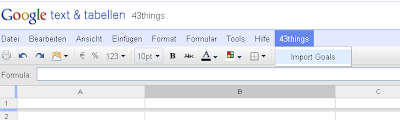
Auf einfache Weise lassen sich andere Google-Services aber auch beliebige Web-Services einbinden. Selbst das Menü der Spreadsheet-Ansicht kann man erweitern.
Um das mal auszuprobieren, habe ich das "Zielerreichungs-Portal" 43things eingebunden. Den Code gibt es hier und bald auch in der Google-Script-Gallery.
Den Script-Editor erreicht man unter dem Menüpunkt "Tools" - wenn die Funktion onOpen() ausgeführt wird, erscheint der zusätzliche Menüpunkt "43things". Wenn das Script mit der Tabelle gespeichert wird, wird onOpen() automatisch beim Laden des Dokuments aufgerufen.
Wählt man "Import Goals" aus, wird man aufgefordert, den 43things-Nutzernamen einzugeben und schon werden die Ziele und Einträge zu den Zielen des Nutzers in die Tabelle eingefügt.
Allerdings ist die Anzahl der Einträge pro Ziel momentan auf 20 beschränkt - das hängt mit der Pagination-Einstellung des aufgerufenen Services zusammen.
Die Scripte werden übrigens server-seitig aufgerufen. Also insgesamt ein hoher Coolness-Faktor und viele viele Möglichkeiten ...


Montag, 19. April 2010

WLAN und LAN sichern mit IEEE 802.1X und RADIUS

heise.de hat heute meinen C't Artikel aus dem Jahr 2004 ("Schlüsseldienst") generalüberholt und aktualisiert (von mir) auf heise Netze veröffentlicht.
Unter dem Titel "WLAN und LAN sichern mit IEEE 802.1X und RADIUS" gibt's eine Übersicht über IEEE 802.1X, RADIUS und EAP.

Sonntag, 18. April 2010

Squeak on Android

Seit geraumer Zeit arbeite ich am "Squeak on Android" Projekt mit: http://code.google.com/p/squeak-android-vm/ - ich möchte hier nur kurz auf den hohen Coolness-Faktor hinweisen.
Wenn das alles richtige funktioniert, kann man mit Squeak/ Smalltalk (die beste Programmiersprache der Welt) auf einfache Weise Anwendungen für das Android-Betriebssystem entwickeln.
Ich glaube, dass das Android OS seinen Marktanteil als Betriebssystemen für Mobiltelefone in Zukunft erheblich steigern wird und dass es sicherlich demnächst sowas ähnliches wie das iPad von Apple auch von Google geben wird. Es lohnt sich sicher, sich mit dieser Plattform näher auseinanderzusetzen.
Außerdem ist mir Android viel sympatischer als die meisten anderen Plattformen für die Entwicklung mobiler Anwendungen, incl. iPhone etc. - Android ist ein offenes System, es gibt komfortable/ freie Entwicklungsumgebungen für die Entwicklung von nativen Anwendungen und für die Entwicklung mit einer Java-API, außerdem gute Dokumentationen und Diskussionsforen.
Aber der Hauptgrund, warum ich das mache: Weil ich Spaß daran habe.

Dienstag, 23. Juni 2009

BabyTwitter


Eine recht nerdische Form des Babyphones: Wenn das Geschrei des Nachkommens einen gewissen Lautstärke-Level übersteigt, wird eine konfigurierbare Nachricht über den ebenfalls konfigurierbaren Twitteraccount gesendet.
Ich habe dafür z.B. einen extra Twitter-Account angelegt: stefcom_alerts, dem ich mit meinem normalen Twitter-Account stefcom folge. Wenn mein Sohn in seinem Bettchen jammert, sehe ich das sofort in meiner Twitter-Timeline auf dem Handy.
Keine große Sache, das kleine Java-Programm war mehr nur so eine Programmierübung in einer schlaflosen Nacht während meiner Elternzeit. Vor allem die Lautstärke-Erkennung ist wahrscheinlich noch nicht perfekt und müsste mal überarbeitet werden.
Hier die Sourceforge-Seite des Projekts: http://sourceforge.net/projects/babytwitter/

Mittwoch, 3. Juni 2009

Artikel von mir im Genießerzeit Blog

Im wunderbaren Genießerzeit Blog (www.geniesserzeit-blog.de) wurde ein Artikel von mir veröffentlicht: "Oolong - ein Tee für Genießer".
Der Genießerzeit Blog ist eine Fundgrube für alle Genießer - es gibt Rezepte, Locations, Events und Tipps rund um das Thema Genuß.
Bisher habe ich mich ja nur zu meist sehr technischen Themen ausgelassen - mal sehen, ob ich mich in Zukunft öfter mal zu den wirklich wichtigen Dingen des Lebens äußere.
Genuß im Allgemeinen und Tee im Speziellen sind jedenfalls wichtig.