Mittwoch, 15. Juni 2011

JTalk Server now using Backends on Google App Engine

My JTalk-Server project has some interesting new features. First of all: i'm using Google Backends to handle the Javascript scope on the server-side. Backends are a new feature of the Google App Engine 1.5. and allow the usage of long-running processes in the background.
Now i have two servlets - the original JTalk-Servlet for saving the jtalk.js or resetting etc. and second one, the backend servlet for executing smalltalk code on the server and for maintaining a user session.
The main cause for using backends was that the ScriptEngine for executing Javascript was not serializable, so it was necessary to setup the JTalk environment for every server roundtrip.
The call to the backend looks like that:
        BackendService backendsApi = BackendServiceFactory.getBackendService();
        String rhinoscopeURL = "http://" + backendsApi.getBackendAddress("rhinoscope", 0) + "/jtalk_backend";
        System.out.println(("rhinoscopeURL: " + rhinoscopeURL));

        URLFetchService fetchService = URLFetchServiceFactory.getURLFetchService();
        HTTPRequest requestToBackend = new HTTPRequest(new URL(rhinoscopeURL), HTTPMethod.POST);
        requestToBackend.setPayload(("contentString=" + contentString + "&owner=" + owner + "&commandString="+commandString).getBytes());

        HTTPResponse responseFromBackend = fetchService.fetch(requestToBackend);
        byte[] respContent = responseFromBackend.getContent();

        String resultString = new String(respContent);

The full code is available here.

As mentioned in this thread, backends on GAE only work in production-mode by using the appcfg.cmd:
C:\Users\krecher\Documents\eclipse\plugins\com.google.appengine.eclipse.sdkbundl
e_1.5.0.r35v201105092302\appengine-java-sdk-1.5.0\bin>appcfg.cmd backends update
 "C:\Documents and Settings\krecher\My Documents\workspace\jtalk-server\war"
Otherwise the backends won't appear in the admin-console of the GAE.
In development mode the existence of a backends.xml is enough for using backends.

Another new feature is the possibility to pass arguments to the RemoteRunner. Without passing arguments from the client to the server that whole thing would be completly useless ...

A call with arguments would look like that:

RemoteRunner new runClass: RemoteTest3 with: #('hack' 'the' 'planet')

The arguments should be an array of strings.

The last new feature ist the usage of a logger in the Javascript-Scope on the server-side.
Here an excerpt from the example class: params do: [ :each | {'logger.fine(each);'} ].
logger is the logger-instance of the servlet.

If you want to use these new features, and you've used the JTalk Server on GAE before, remember to first press the Reset-button and then press "Export & Save JTalk to DB".

I guess the next step will be to implement a binding for the google-datastore-api.

Mittwoch, 25. Mai 2011

RemoteRunner for JTalk Server

As announced in an earlier blog-post, i implemented a RemoteRunner for the jtalk-server (based on the jtalk-project). It's very simple: if you implement a Method runRemote in your class, e.g. RemoteTest, then by executing:
RemoteRunner new runClass: RemoteTest
will execute the Smalltalk-Code implemented in the runRemote-Method on the server. The example prints out the date and time of the server.
To see how the results can be transferred back to the client-caller, just look at the example-class.
The jtalk.js on the server-side is exactly the same as the one on the client-side. So if you make changes, don't forget to press the button "Export & Save JTalk to DB".
If you like to play around with this new feature and you played around with jtalk-server before (and pressed the save-button), you need to reset the jtalk.js by pressing the button. This is because, the jtalk.js will be saved to the database for every user (identified by his/ her google-id). So changes made to the jtalk.js, which is located in the server-filesystem won't get executed, because on startup (page-load) a jtalk.js in the DB, associated with the current google-user, has priority.
The JVM of the JDK/ JRE 6 is packaged with a ScriptEngine for executing Javascript. This feature is currently not supported on the Google App Engine, so i needed to use the "external" Rhino-jar, and a slightly different mechanism. Here is some work needed on optimizing the server-execution. So, the jtalk.js on the server should get reduced to the classes that are needed on the server (no canvas etc.) and most imported, the precompiled jtalk.js should get persisted somehow. Currently the complete javascript-source of the Smalltalk-System is executed/ interpreted for every call on the server.
But the next step will be to use the GAE persistence-layer via java-calls from Smalltalk/ Javascript to the google-api. Calling java is already possible and i think this is where the fun begins ...

Dienstag, 10. Mai 2011

Smalltalk & Java: JTalk Server

Recently I was playing around with the amazing Jtalk Project. It's a Smalltalk-System running on top of Javascript - completly in your browser!
I have some far away goals for software development in mind:
1. develop Software from within a Browser
2. use Smalltalk as primary Language, because it's the best programming language ever :-)
3. have interfaces to the JVM, so i can use sophisticated and reliable frameworks
There are a few Projects i know of, that address the goal of integrating Smalltalk with the Java (redline, Athena) but none of them seems to be very stable.
Now i found out, that Jtalk could do the job! So i spend a little time to set up a project hosted on the google app engine that serves as a development home for Jtalk Projects, where you have the possibility to save the current "state" (the complete source) to a database and resume developing anywhere anytime. You need a google-account to use it.
In this thread on the jtalk-discussion-group, i showed that it is possible to run Jtalk on top of the JVM and execute Smalltalk-Code. The way back - calling Java-Classes from Smalltalk is shown also.
At the moment my project only uses Jtalk on the client-side, the next step will be, make it run on the server-side.
Here's the link to where you can test JTalk Server: http://jtalk-server.appspot.com/ and the code is here: http://code.google.com/p/jtalk-server/
Any help, tipps or comments are welcome!

Dienstag, 27. April 2010

Ich war dabei!

Ich war am 24.4.2010 Teil der 120km langen Menschenkette zwischen den Atomkraftwerken Krümmel und Brunsbüttel und habe gegen die Pläne der Bundesregierung demonstriert, die Laufzeit der Atomkraftwerke zu verlängern.
Tolles Wetter und trotz ernstem Anlaß ein riesen Spaß. Ein großer Tag für die Anti-AKW-Bewegung.

Donnerstag, 22. April 2010

Google apps script und 43things

Eher zufällig bin ich auf ein ziemlich praktisches Feature bei Google Docs & Spreadsheets gestoßen: Es gibt einen recht ausgereiften Javascript-Editor (Syntax-Highlightning, Code-Completition) mit einer umfangreichen API zur Manipulation von (u.a.) Tabellen-Dokumenten.
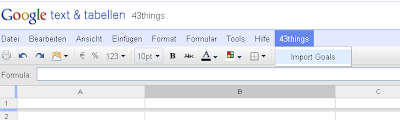
Auf einfache Weise lassen sich andere Google-Services aber auch beliebige Web-Services einbinden. Selbst das Menü der Spreadsheet-Ansicht kann man erweitern.
Um das mal auszuprobieren, habe ich das "Zielerreichungs-Portal" 43things eingebunden. Den Code gibt es hier und bald auch in der Google-Script-Gallery.
Den Script-Editor erreicht man unter dem Menüpunkt "Tools" - wenn die Funktion onOpen() ausgeführt wird, erscheint der zusätzliche Menüpunkt "43things". Wenn das Script mit der Tabelle gespeichert wird, wird onOpen() automatisch beim Laden des Dokuments aufgerufen.
Wählt man "Import Goals" aus, wird man aufgefordert, den 43things-Nutzernamen einzugeben und schon werden die Ziele und Einträge zu den Zielen des Nutzers in die Tabelle eingefügt.
Allerdings ist die Anzahl der Einträge pro Ziel momentan auf 20 beschränkt - das hängt mit der Pagination-Einstellung des aufgerufenen Services zusammen.
Die Scripte werden übrigens server-seitig aufgerufen. Also insgesamt ein hoher Coolness-Faktor und viele viele Möglichkeiten ...


Montag, 19. April 2010

WLAN und LAN sichern mit IEEE 802.1X und RADIUS

heise.de hat heute meinen C't Artikel aus dem Jahr 2004 ("Schlüsseldienst") generalüberholt und aktualisiert (von mir) auf heise Netze veröffentlicht.
Unter dem Titel "WLAN und LAN sichern mit IEEE 802.1X und RADIUS" gibt's eine Übersicht über IEEE 802.1X, RADIUS und EAP.

Sonntag, 18. April 2010

Squeak on Android

Seit geraumer Zeit arbeite ich am "Squeak on Android" Projekt mit: http://code.google.com/p/squeak-android-vm/ - ich möchte hier nur kurz auf den hohen Coolness-Faktor hinweisen.
Wenn das alles richtige funktioniert, kann man mit Squeak/ Smalltalk (die beste Programmiersprache der Welt) auf einfache Weise Anwendungen für das Android-Betriebssystem entwickeln.
Ich glaube, dass das Android OS seinen Marktanteil als Betriebssystemen für Mobiltelefone in Zukunft erheblich steigern wird und dass es sicherlich demnächst sowas ähnliches wie das iPad von Apple auch von Google geben wird. Es lohnt sich sicher, sich mit dieser Plattform näher auseinanderzusetzen.
Außerdem ist mir Android viel sympatischer als die meisten anderen Plattformen für die Entwicklung mobiler Anwendungen, incl. iPhone etc. - Android ist ein offenes System, es gibt komfortable/ freie Entwicklungsumgebungen für die Entwicklung von nativen Anwendungen und für die Entwicklung mit einer Java-API, außerdem gute Dokumentationen und Diskussionsforen.
Aber der Hauptgrund, warum ich das mache: Weil ich Spaß daran habe.